Showing posts with label midi. Show all posts

Sunday, January 22, 2017

Rhythm Assembler

And now something completely different... A step sequencer.

Well, it really is a bit different. Rhythm Assembler is a drum computer script I wrote for Kontakt, remains of a cancelled project. Usually a step sequencer has a regular grid, you can use to place notes. Here, you define the grid structure, assuming there's a note at every step. It may seem backwards, but once you overcome old habits, it may be simpler to do it this way. Example, you want a four on the floor, you only need to program one step. Also, I feel, breaking down a rhythm to such formula, gives me a better understanding, of how the rhythm works.

The machine offers 8 sequence tracks, each can have a different grid sequence with different cycle loop. Grid step is defined as a multiplication or fraction of base duration, like "1 quarter note", "3 sixteenth notes", "1/3 half note" or "3/4 whole note". On top of that you can program a repeat sequence, telling the machine how many times to repeat a grid step. Considering both sequences can have a different loop cycle, it is possible to program fairly complex rhythms with a simple formula. Also the sequencer is not bound to a time signature, you can program odd, irregular rhythms, rhythms with asymmetric measures.
Another, somewhat uncommon feature of the sequencer is the "humanizer" function, which not only can delay notes by random duration, but can play them too early as well. This "timing error" function can be configured separately for each track.

And here's a quick overview video:

Rhythm Assembler is just a script, it comes with no samples and no instrument patches. There are script preset files, you can add to an existing instrument. Which is also the reason, there is no custom graphic interface and the background is black (for the workaround to disable instrument's background image). The script requires Kontakt 5.6.5 or later to work. It could be rather easily ported to any earlier version of Kontakt 5 and with some work and (loosing option to rename sounds) to Kontakt 4.

The script is free to download and use (although it's not free to re-distribute). DOWNLOAD IT HERE. To install the script, you need to locate Kontakt's user preset/scripts folder and copy the "Rhythm Assembler" directory there. There are several example presets, with pre-programmed rhythms and an "empty" preset.

There's some further beta development, you can follow here (scroll down the thread).

Friday, February 19, 2016

Beat Assembler XT

Beat Assembler XT is drum computer instrument based on experimental design, extended version of previously posted Beat Assembler 48. It is using randomly or manually generated pattern model, which is then being used as basis for creating a drum sequence. The machine is using series of quantizers and sound mappers to re-shape model pattern, fitting it into a time-frame of choice, allowing user to observe the results on the fly.

New and expanded features in  XT version:
  • bigger master sequence size (128 notes) and more optimized calculations, which it would require,
  • 99999 automatic pattern generator presets,
  • up to 16 voice groups,
  • drag'n'drop MIDI export, drop final pattern directly to DAW, or to a file manager to create a midi file,
  • preset system, 10 memory slots and support for saving sequences to a file (so they can be loaded into another Beat Assembler patch),
  • displacer mechanism, introduce 'little changes' to a pattern with single knob,
  • expanded manual editor with handful of new tweaks (including copy/paste mechanism, so you can drop a portion of one pattern into another easily),
  • filter bank access, filter type can be set quickly from drop-down menu, for each voice group individually,
  • resizeable drum kit, makes it easy to create custom drum kits, use the machine as sample shell,
  • 12 patches, including a re-creation of obscure polish analog drum machine from the 80's (which I took apart and soldered voice on/off switches, so I could capture each sound separately and then hand programmed re-constructed rhythm patterns in Beat Assembler),
  • 36 hand programmed patterns (as opposed to automatically generated ones) to experiment with (can be loaded from file in nka format),
  • five background variations, change the machine looks in setup panel,
  • and, as usual, a fairly confusing manual in strange English.
Here's a video overview, jamming with three instances of Beat Assembler in standalone Kontakt:


Beat Assembler XT is available on Loot Audio.

It requires full version of Kontakt 5.5.1 or newer to run (Free version will run on Kontakt 4, but XT is actually using Kontakt's new features, like changing filter type from script).

Friday, June 5, 2015

CC switch, virtual sustain pedal multiscript for Kontakt

I wrote this little Kontakt multiscript to automate sustain pedal from midi keyboard. I tend to loose sustain pedal in my floor level room chaos, as I keep it unplugged and I don't quite use it too often. I thought it would sometimes be handy to have a midi key acting as a CC switch, if only for testing purposes.


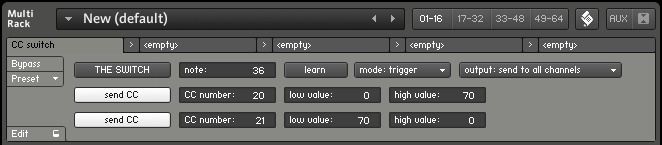
So, this script can be used to make a key act as sustain pedal, which is default setting, or to automate any other CC controller. You can assign two values to a CC and then switch between them, using midi keyboard or virtual button. Also you can set automation for secondary CC, so you could automate two different settings with the switch.

In example on screenshot, pressing MIDI key 36, will set CC20 to 0 and CC21 to 70. Releasing the key will set CC20 to 70 and CC21 to 0.

You can download the script preset here. It needs to be copied to multiscript preset folder (in my Windows it's "my documents\Native Instruments\Kontakt 4\presets\multiscripts"). This is multiscript, so you load it on top of instruments (use the scroll button). It has been written in Kontakt 4.2.4.