Available at Loot Audio.

Showing posts with label machine. Show all posts
Showing posts with label machine. Show all posts
Tuesday, February 20, 2018
Cracklefield update 1.2
I updated Cracklefield to 1.2, introducing introducing field animator, new function which can dynamically transform the whole sequencer field. The field can be scrolled, rotated or evolved using game of life family of cellular automata. Different transformation modes can be sequenced or combined for some extra generative fun.
Available at Loot Audio.
Available at Loot Audio.

Friday, July 21, 2017
Cracklefield
I have released new music machine at Kontakt Hub, it's named Cracklefield. This idea has been following me for a long time. I imagined a grid based sequencer, with objects traveling in different directions, bouncing off walls and colliding with each other, creating dynamically evolving patterns. Cracklefield is such generative music machine, experimental sequencer, more a simulation, than a loop player.
 The sequencer workspace, the field, is cellular grid. The field can be read or modified by cursors, pointing at sequence track playing position. The cursors can travel the filed in any direction, horizontally, vertically or diagonally, each at it's own rate. They can bounce off field edges or obstacles (walls) and, what is the fun part, bounce off each other. Just imagine several sequencer tracks playing 'pong' with each other. On next level, cursors can interact with the field; paint, erase or flip cells, build or destroy walls, shift whole field rows or columns. It's a playground for building evolving patterns - set initial conditions and see what would it sound like.
Cracklefield can also use cellular automaton named 'Langton's ant'. An ant is basically a cursor, which changes direction depending on what kind of cell it steps on. For example, it turns right on a filled cell and turns left on an empty cell, flipping the state of cell it has visited. Sounds very simple, yet it creates surprisingly complex structures. In Cracklefield you can combine several ants of different types to explore variety of possible generative pattern setups. The machine is using a note map, assigning each cell a note number, according to one of different algorithms, to play melodies, or create round robin percussive patterns.
Cracklefield can also act as an apreggiator. Each cursor can be bound to one of notes from the chord being currently held. Arp patterns can modulated (transposed depending on cursor position) and fit to a scale pattern, while each cursor can play a different sound.
Here's a video showing some of the possibilities:
This machine is not really about the sounds, but it has been built on a sample player, so obviously it needs samples. I wasn't quite sure how to approach this and in the end I decided to pick a set of sounds that, most likely, nobody would have already, as it's not a kind of instrument, one would be interested in just to get more pianos. The Cracklefield sample set is mostly based on acoustic/electroacoustic instruments, or found sounds, unconventional, experimental or unusual sounds, featuring a hollow soviet balalaika, copper rod mallets made with contact microphones, experimental guitar setups, glass chimes or wire-brushed crash cymbals. On the other hand, the machine is designed, to make adding new sounds relatively easy; just duplicate a group, put new samples and refresh the instrument. There's also a built-in note recorder, it allows the user to capture multichannel MIDI clips, which then can be exported to a DAW by drag'n'drop mechanism and reused elsewhere.
Here's another video, playing with random electronic drum samples, shows how it looks and sounds to use the instrument:
It is thus far the largest, most complicated and one of the most unusual projects I put myself into. If you'd like to learn more about Cracklefield functionality, see the manual:
http://www.fairlyconfusing.net/docs/cracklefield.pdf
Or watch even more videos:
Cracklefield needs full version of Kontakt 5.6.6 or newer to run. It takes 950MB of hard drive space after unpacking (the samples are in plain wav format). You will need at least 1280x1024 screen resolution to be able to see the whole interface without scrolling, it's bigger than standard ones, as there are plenty of controllers.
It's available from Loot Audio:
Now updated to 1.2 - with field animator...
Cracklefield can also use cellular automaton named 'Langton's ant'. An ant is basically a cursor, which changes direction depending on what kind of cell it steps on. For example, it turns right on a filled cell and turns left on an empty cell, flipping the state of cell it has visited. Sounds very simple, yet it creates surprisingly complex structures. In Cracklefield you can combine several ants of different types to explore variety of possible generative pattern setups. The machine is using a note map, assigning each cell a note number, according to one of different algorithms, to play melodies, or create round robin percussive patterns.
Cracklefield can also act as an apreggiator. Each cursor can be bound to one of notes from the chord being currently held. Arp patterns can modulated (transposed depending on cursor position) and fit to a scale pattern, while each cursor can play a different sound.
Here's a video showing some of the possibilities:
This machine is not really about the sounds, but it has been built on a sample player, so obviously it needs samples. I wasn't quite sure how to approach this and in the end I decided to pick a set of sounds that, most likely, nobody would have already, as it's not a kind of instrument, one would be interested in just to get more pianos. The Cracklefield sample set is mostly based on acoustic/electroacoustic instruments, or found sounds, unconventional, experimental or unusual sounds, featuring a hollow soviet balalaika, copper rod mallets made with contact microphones, experimental guitar setups, glass chimes or wire-brushed crash cymbals. On the other hand, the machine is designed, to make adding new sounds relatively easy; just duplicate a group, put new samples and refresh the instrument. There's also a built-in note recorder, it allows the user to capture multichannel MIDI clips, which then can be exported to a DAW by drag'n'drop mechanism and reused elsewhere.
Here's another video, playing with random electronic drum samples, shows how it looks and sounds to use the instrument:
It is thus far the largest, most complicated and one of the most unusual projects I put myself into. If you'd like to learn more about Cracklefield functionality, see the manual:
http://www.fairlyconfusing.net/docs/cracklefield.pdf
Or watch even more videos:
Cracklefield needs full version of Kontakt 5.6.6 or newer to run. It takes 950MB of hard drive space after unpacking (the samples are in plain wav format). You will need at least 1280x1024 screen resolution to be able to see the whole interface without scrolling, it's bigger than standard ones, as there are plenty of controllers.
It's available from Loot Audio:
Now updated to 1.2 - with field animator...
Tuesday, May 2, 2017
Beat Knitter

The instrument has a very simple sound set, consisting of few one shot sounds. It has a basic four track sequencer, you can control overall velocity and a speed rate of each track. Besides one-button pattern generator, there are several other automated functions, some different, more or less random pattern generators and several pattern transformations, tracks can be shuffled, mirrored, de-synchronized, inverted and even there's 4x4 field 45 degree rotation, so you can play the pattern upward-down...
Drum pattern can be exported to MIDI clip anytime, via drag'n'drop, so the machine can be used to quickly sketch different variations of a beat to use with another instrument.
Here's how it works:
The machine is free to get and make noise with. Download here. You will need full version of NI Kontakt 5.6.6 to run it. Leave me a note if you find it fun, or useful, or garbage.
Tuesday, December 13, 2016
Spookomatic

Spookomatic is self-configuring sound machine, it automatically creates random patches, which can be tweaked afterwards. Just press the shuffle button and hear what you can find, it's a sort of a ghost in the machine.
Here's a how it sounds, in a compilation of different patches:
And here's a brief guide to user interface:
There are eleven step sequencers per layer, modulating parameters, like pan, tune, filters cutoff and send effect levels. What is uncommon about the sequencers, is that the sequence can be interpolated, that is, the parameter values can change gradually in between sequence steps, according to different curves. Each sequencer can run at different speed and different cycle, creating quite non-repetitive, yet tempo synchronized textures.
Here's how modulation sequencers work:
Spookomatic in cold numbers:
- 21 melodic sound sources, created with acoustic instruments (guitars, reed organ, voice, non-musical objects), vintage analog synthesizer and digital synthesis,
- 30 types of background noise from field recordings, or digital sound manipulation,
- 192 noise fragments to create sequenced ambiance,
- up to 10 sound layers,
- up to 110 modulation sequencers,
- 4 instrument configurations,
- 144 selected presets,
- 999999999 possible patches.
It's available at Loot Audio.
This instrument is new take on the idea, I was exploring with older, free instrument, Scape-o-matic. It has similar character and engine, though Spookomatic takes it to a new level.
Wednesday, October 12, 2016
Chop Shop
 This sound machine took a long while to build, mainly because there was always something else in the way. Possibly it is the most confusing one, which might be the reason I have been putting it aside for so many times.
I have been using this tool to automate sample chopping and slice sequencing for experimental/glitch/collage kind of music. There is a sequencer, which aside from playing sample slices, can be programmed, to change its parameters at certain points of the sequence. For example, it can be set to increase sample playback offset every second sequence step and/or set different filter cutoff every 6th sequence step. At higher level it can remember several sequence parameters and play those in defined order to create complicated structures. As many of instruments I created, it takes advantage of seed based pseudo-random number generator, so any event can be set to random, derived and re-played from initial seed number. This way you an completely change the output of a complicated structure, simply by changing the seed.
In the following video, I play around loading different presets and changing general parameters. Offset, seed and sample knobs in effect panel modify those values throughout any program sequence, playing with them on presets is an easy way to start having fun with Chop Shop.
The machine is designed to use sound fragments (parts of a more or less finished tracks) and re-organize them, in a way unrelated to original tempo. In other words, it doesn't use multisamples and it's not suitable to chop 'beats'. It is however synchronized to host's tempo. I included a set of somewhat random samples. Custom samples can be used, but you will need to rename and replace the sample files.
To play with Chop Shop, you will need full version of NI Kontakt sampler 5.5.2 or newer. The instrument is free to use, you can get it HERE, it's 62MB file. It comes with fairly confusing manual in PDF file. If you don't get it, read the manual (I can't guarantee it will help though). Have fun.
A note on presets: This instrument is using its own preset system, presets should be in /presets/ folder. Each preset is being saved in two separate files, it should be possible to trade/exchange/copy presets files between different instrument copies.
And here's small intro to programming the critter...
Friday, February 19, 2016
Beat Assembler XT
Beat Assembler XT is drum computer instrument based on experimental design, extended version of previously posted Beat Assembler 48. It is using randomly or manually generated pattern model, which is then being used as basis for creating a drum sequence. The machine is using series of quantizers and sound mappers to re-shape model pattern, fitting it into a time-frame of choice, allowing user to observe the results on the fly.
 New and expanded features in XT version:
Beat Assembler XT is available on Loot Audio.
It requires full version of Kontakt 5.5.1 or newer to run (Free version will run on Kontakt 4, but XT is actually using Kontakt's new features, like changing filter type from script).
New and expanded features in XT version:- bigger master sequence size (128 notes) and more optimized calculations, which it would require,
- 99999 automatic pattern generator presets,
- up to 16 voice groups,
- drag'n'drop MIDI export, drop final pattern directly to DAW, or to a file manager to create a midi file,
- preset system, 10 memory slots and support for saving sequences to a file (so they can be loaded into another Beat Assembler patch),
- displacer mechanism, introduce 'little changes' to a pattern with single knob,
- expanded manual editor with handful of new tweaks (including copy/paste mechanism, so you can drop a portion of one pattern into another easily),
- filter bank access, filter type can be set quickly from drop-down menu, for each voice group individually,
- resizeable drum kit, makes it easy to create custom drum kits, use the machine as sample shell,
- 12 patches, including a re-creation of obscure polish analog drum machine from the 80's (which I took apart and soldered voice on/off switches, so I could capture each sound separately and then hand programmed re-constructed rhythm patterns in Beat Assembler),
- 36 hand programmed patterns (as opposed to automatically generated ones) to experiment with (can be loaded from file in nka format),
- five background variations, change the machine looks in setup panel,
- and, as usual, a fairly confusing manual in strange English.
Beat Assembler XT is available on Loot Audio.
It requires full version of Kontakt 5.5.1 or newer to run (Free version will run on Kontakt 4, but XT is actually using Kontakt's new features, like changing filter type from script).
Tuesday, December 8, 2015
Beat Assembler 48
 This experiment took me a while to complete and it made me scratch my head pretty hard a couple of times. I wanted a drum machine in Kontakt, that wouldn't be bound to 4/4 signature and standard time grid. Also I wanted to break with table based patterns and have visual presentation more like in a DAW.
Beat Assembler does that and more. It's a drum machine with sequencer, which can generate automatic program according to preset scheme and set of parameters. It creates a master pattern which then is being fit into a time-frame, matching current tempo and time signature. The pattern can be quantized to defined grid, which can use a range of unusual note fractions, like 1/5 or 6/11, everything being visualized on the fly. The machine also lets you define time signature manually, so you're not limited to 4/4 in standalone mode, furthermore allowing some irrational settings like 4/3 or 5/7. So, if you like to experiment with strange percussion patterns, you may enjoy this one.
Additional features include:
- four voice groups with automated distribution, where you can set effects and modulation parameters for each group;
- manual sequence editor, so you can move notes around the grid;
- note recorder, so you can play a pattern by keyboard and then quantize it inside out.
Beat Assembler is free to get and play with. It requires full version of Native Instruments Kontakt 4 or newer. Download it HERE. 6 MB, RAR archive. Have fun!
If you like the idea, I have made paid, expanded version of the machine, named Beat Assembler XT, you can read about it here.
Concerning the midi export as requested in the comment, Kontakt 4 can't write midi files. But it does output midi! All you need to do is to go to 'options > engine > send midi to outside world' and make sure 'script generated notes' option is selected. Now, if your DAW supports it, you can patch Kontakt's midi output to a midi track and start recording right away. Beat Assembler XT does export midi clips via drag'n'drop mechanism in Kontakt 5.

Friday, December 4, 2015
Rekombinator
 Rekombinator is new instrument/sample shell for Kontakt, I've been working on. It takes a sample, splits it to fragments and re-sequences them to create new sounds. It can restructure drum loops, create evolving drone pads, glitch effects or turn a voice into robotic madness. In short, it's lot of fun. At least it has been for me.
This instrument requires full version of NI Kontakt 4.24 or newer and is available at Loot Audio.
If you'd like to examine detailed description, here's fairly confusing operator's manual in funny English.
And here you can see it in action:
Monday, July 13, 2015
The Device

This space age instrument can play back a 10 layer set of sound sequences, along with sequenced modulators program. Sequences can be picked randomly, picked by an id number or programmed by hand, although the last option is somewhat tedious task. The instrument is using two main sample sets. 'Space circuits' set is analog electronic, created with an old Sequential Circuits synthesizer. 'Alien waveforms' set is mainly made of acoustic recordings, stretched and re-shaped digitally. Together there are 160 wav samples, 44,1 Mhz/ 16 bit. And here's a 'glimpse through' the device's interface and possibilities.
If you would like to explore this machine, you can download it HERE, 12MB rar archive. Note that you need full version of Native Instruments Kontakt sampler, version 4.24 or newer to make it work.
There is no manual and I'm currently not planning to write one, however I can offer some tips:
- Use 'info pane' feature, all controls should have some explanation there.
- There are three patches which are different in maximum step sequencer size, basic version has 48 steps, other patches offer 64 and 96 steps sequences.
- When automatic modulation is off, you can set layer properties (tune, filter cutoff and such) by hand, using display panel.
- Memory will only store automatically generated programs.
- You can also save spatial effects configuration and current kit in memory, using optional save switch.
- Modulators can be bypassed completely in automation panel, volume modulator is bypassed by default.
- Pitch table in setup panel is obsolete, basically it has no function anymore.
- Structure knob overwrites settings in setup panel, manual edits to those settings will be saved as current structure knob settings.
- Yes, it is fairly confusing device.
- To use custom samples simply drag samples into existing groups, the machine assumes samples are assigned starting from note 0, after changing group contents update 'sample count' setting for given layer/group in sequencer monitor. You can use auto 'detect' button.
- Change group names to re-name layers.
- Locking a layer will prevent the machine from automatically writing layer sequences, but they can still be edited manually.
- MIDI keys functions can be edited freely.
- This instrument is largely similar to Cracklebot and Haunted Jukebox, which actually have manuals. Sonocipher is basically The Device with different sample-set and GUI.
Monday, June 8, 2015
Melocipher
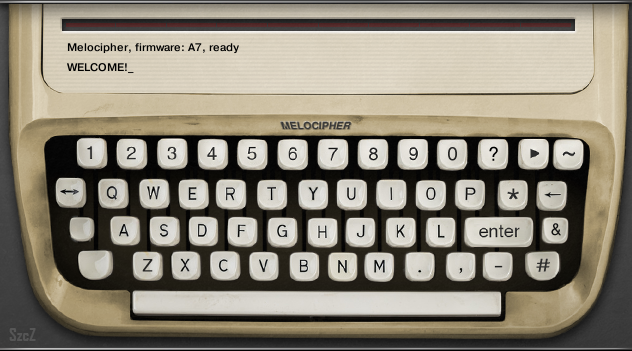
Melocipher is largely similar to Sonocipher, so have a look at my previous post for usage tips. The new feature is, that you can actually play the instrument, it accepts notes and plays them back as ordinary synthesizer, so you can jam along with the machine created sequences. Melocipher is using a set of basic waveforms: sine, saw, triangle and pulse, the whole sample set is only 32KB. You could paste new zones into existing groups, if you'd like to try it on more sophisticated sounds, like a piano.
There is new control key, labelled "&", which has three different applications. It's main function is to change instrument layer (which differs in waveform, modulated effects and volume envelope) to be used for incoming notes, in other words the sub-instrument you can play by midi keyboard.
The instrument will pick a note snap pattern for each sequence, which will be used to "force-fit" computer generated notes. It is rough equivalent of using scale and root key. You can see snap pattern applied on Kontakt virtual keyboard, keys which are not used are colored black. Snap pattern is calculated from first 5 characters of the input string. However you can change pattern and root after creating a sequence. Hold "shift" and click "&" on virtual keyboard to change pattern root. Hold "control" and click "&" to change the pattern. Pitch wheel will shift the playing sequence over the keyboard, with respect to current snap pattern.
Sonocipher is virtual machine for Native Instruments Kontakt sampler. It requires full version of Kontakt 4.24 or newer (you can open it in Kontakt Player, but it will go into demo mode after a while). It is free to download and use for private or public amusement. You can get it HERE - 4MB, zip archive.
Thursday, June 4, 2015
Sonocipher

Audio output example:
http://www.fairlyconfusing.net/audio/electronic_dane_music_of_tomorrow.mp3
The machine is quite simple to use, you use virtual keyboard to type in text, then press "enter" to decode it into sound sequence. "Play" button in upper right corner starts sequence playback. And here's how it works:
Sonocipher is virtual machine for Native Instruments Kontakt sampler. It requires full version of Kontakt 4.24 or newer. It is free to download and use for private or public amusement. You can get it HERE - 12MB, zip archive, includes sample set and Kontakt program.
This machine is rather simple, so there is no manual. Here are some tips and hidden functions:
- press 'enter' when input line is empty to recall last entered text,
- hold 'control' key while clicking the backspace button to erase whole line,
- 'wave' button next to 'start' button activates modulation sequencers, which will animate audio effect and distribute signal to spatial processors,
- 'hash' button triggers spatial effect auto configuration function,
- click 'asterisk' button to generate random text sequence, then press 'enter' to decode it,
- big blank key in bottom left corner, shifts between spatial modes, which will change signal distribution to spatial processors,
- little blank key activates 'glitch playback' mode,
- hold shift and click comma button to enter apostrophe character,
- hold shift and click question mark button to enter exclamation mark character,
- use modwheel to change sequence properties,
- this instrument doesn't read computer keyboard, you need to click through virtual buttons,
- the instrument only uses capital letters,
- some functions (like clock restart or modulators reset) are only available from midi keyboard keys,
- similar text string will generate similar sound sequences,
- very short strings will generate very simple sequences, make your text 10 characters to make the machine use all layers, the input text limit is 50 characters.
Graphic interface is based on stock agency photo.
There is a "melody machine" variant of this device, read here.
Monday, December 15, 2014
Haunted Jukebox - sound exploration device

If you'd like to get into details, try these fairly confusing manuals in funny English: operator's manual, service manual.
The machine requires full version of Kontakt 4.2 or possibly newer and considerable amount of CPU, also it relies on transport synchronization with host. It might happen, it won't initialize properly in certain hosts, at least until you start playback. In short, it may or may not work for you, you will need to find it out experimentally.
There are two free sets/configurations available:
Minimal Noise Set is made, as the name suggests, of different noise fragments. This is 10MB download and is free to get and use to make noise, privately or commercially.
Junk Percussion Set is using junk percussion samples that I recorded some time ago. It's also free to get. The download doesn't include the samples, which you need to get by separate download here. Unpack samples to 'samples' directory.
If you like the idea and the machine works for you, there is third set available at Sampleism. This version, besides different sample set, offers access to configuration panels (fine-tune engine, midi learn for keyboard automation, groove generator setup).
Subscribe to:
Posts (Atom)