Tuesday, December 8, 2015

Beat Assembler 48

This experiment took me a while to complete and it made me scratch my head pretty hard a couple of times. I wanted a drum machine in Kontakt, that wouldn't be bound to 4/4 signature and standard time grid. Also I wanted to break with table based patterns and have visual presentation more like in a DAW.
Beat Assembler does that and more. It's a drum machine with sequencer, which can generate automatic program according to preset scheme and set of parameters. It creates a master pattern which then is being fit into a time-frame, matching current tempo and time signature. The pattern can be quantized to defined grid, which can use a range of unusual note fractions, like 1/5 or 6/11, everything being visualized on the fly. The machine also lets you define time signature manually, so you're not limited to 4/4 in standalone mode, furthermore allowing some irrational settings like 4/3 or 5/7. So, if you like to experiment with strange percussion patterns, you may enjoy this one.

Additional features include:
  • four voice groups with automated distribution, where you can set effects and modulation parameters for each group;
  • manual sequence editor, so you can move notes around the grid; 
  • note recorder, so you can play a pattern by keyboard and then quantize it inside out.
Here's a video, where I'm trying out the machine:


Beat Assembler is free to get and play with. It requires full version of Native Instruments Kontakt 4 or newer. Download it HERE. 6 MB, RAR archive. Have fun!

If you like the idea, I have made paid, expanded version of the machine, named Beat Assembler XT, you can read about it here.

Concerning the midi export as requested in the comment, Kontakt 4 can't write midi files. But it does output midi! All you need to do is to go to 'options > engine > send midi to outside world' and make sure 'script generated notes' option is selected. Now, if your DAW supports it, you can patch Kontakt's midi output to a midi track and start recording right away. Beat Assembler XT does export midi clips via drag'n'drop mechanism in Kontakt 5.


Friday, December 4, 2015

Rekombinator

Rekombinator is new instrument/sample shell for Kontakt, I've been working on. It takes a sample, splits it to fragments and re-sequences them to create new sounds. It can restructure drum loops, create evolving drone pads, glitch effects or turn a voice into robotic madness. In short, it's lot of fun. At least it has been for me.

This instrument requires full version of NI Kontakt 4.24 or newer and is available at Loot Audio.

If you'd like to examine detailed description, here's fairly confusing operator's manual in funny English.

And here you can see it in action:


Monday, July 13, 2015

The Device

The Device is yet another instrument in series of automatic noise sequencer toys for Kontakt, that I have been tinkering with. I consider it more or less a failed experiment, I'm not sure, if it grew too complicated or I just have lost the drive for it. I was planning to just bury it deep down a hard drive, but after a little hesitation, I decided to share it for free, as it is. This machine is in 'almost finished' state, meaning that it is basically fully working, but it lacks documentation and deeper testing, both of which likely won't happen anytime soon.

This space age instrument can play back a 10 layer set of sound sequences, along with sequenced modulators program. Sequences can be picked randomly, picked by an id number or programmed by hand, although the last option is somewhat tedious task. The instrument is using two main sample sets. 'Space circuits' set is analog electronic, created with an old Sequential Circuits synthesizer. 'Alien waveforms' set is mainly made of acoustic recordings, stretched and re-shaped digitally. Together there are 160 wav samples, 44,1 Mhz/ 16 bit. And here's a 'glimpse through' the device's interface and possibilities.


If you would like to explore this machine, you can download it HERE, 12MB rar archive. Note that you need full version of Native Instruments Kontakt sampler, version 4.24 or newer to make it work.

There is no manual and I'm currently not planning to write one, however I can offer some tips:
  • Use 'info pane' feature, all controls should have some explanation there.
  • There are three patches which are different in maximum step sequencer size, basic version has 48 steps, other patches offer 64 and 96 steps sequences.
  • When automatic modulation is off, you can set layer properties (tune, filter cutoff and such) by hand, using display panel.
  • Memory will only store automatically generated programs.
  • You can also save spatial effects configuration and current kit in memory, using optional save switch.
  • Modulators can be bypassed completely in automation panel, volume modulator is bypassed by default.
  • Pitch table in setup panel is obsolete, basically it has no function anymore.
  • Structure knob overwrites settings in setup panel, manual edits to those settings will be saved as current structure knob settings.
  • Yes, it is fairly confusing device.
  • To use custom samples simply drag samples into existing groups, the machine assumes samples are assigned starting from note 0, after changing group contents update 'sample count' setting for given layer/group in sequencer monitor. You can use auto 'detect' button.
  • Change group names to re-name layers.
  • Locking a layer will prevent the machine from automatically writing layer sequences, but they can still be edited manually.
  • MIDI keys functions can be edited freely.
  • This instrument is largely similar to Cracklebot and Haunted Jukebox, which actually have manuals. Sonocipher is basically The Device with different sample-set and GUI.

Thursday, June 25, 2015

Radiostatic Percussion

Radiostatic Percussion is experimental electronic percussion sample set I have created from radio static noise and interferences. I hooked up an old Japanese radio receiver from late 70's to self oscillating Moog low pass filter and I've been dialing through waves of white noise, strange buzz broadcasts and radio interferences. Then I have sliced these recordings and digitally re-shaped the volume envelope to make them resemble percussion sounds.
The result is quite unique set of warm, noisy, lo-fi, analog electronic percussion hits and effects. When sequenced into a drum pattern, it sounds like this:

http://www.fairlyconfusing.net/docs/radiostatic.mp3

Selected sample set from this experiment is available for free right here. There are 50 one shot samples in wav container, 44 kHz, 16 bit, 1,5 MB zipped. If you like it, the full set of 166 samples is available from Sampleism at a price.

Monday, June 8, 2015

Melocipher

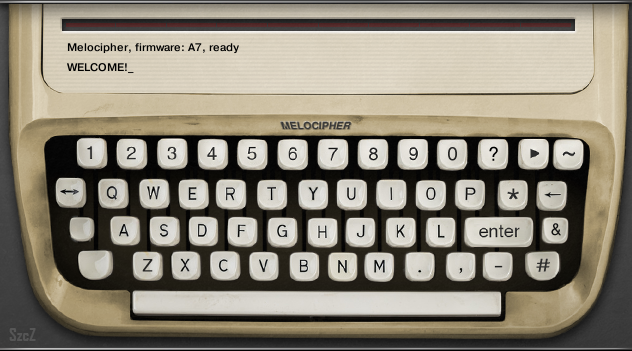
Couple of days ago I posted a joke instrument named Sonocipher. Now I'm gonna take the joke one step further, or maybe one step back... I'm not quite sure. Sonocipher has been designed to automatically generate drum sequences from a text string, which was used as a token for pseudo-random number generator. I attempted to re-configure the instrument, so it would generate somewhat coherent melodic sequences. The modified device is named Melocipher. I wouldn't say this machine is remotely good at composing, but sometimes it can generate an interesting tune stub. It can be used at least as an inspirational tool. Here's a brief video overview:


Melocipher is largely similar to Sonocipher, so have a look at my previous post for usage tips. The new feature is, that you can actually play the instrument, it accepts notes and plays them back as ordinary synthesizer, so you can jam along with the machine created sequences. Melocipher is using a set of basic waveforms: sine, saw, triangle and pulse, the whole sample set is only 32KB. You could paste new zones into existing groups, if you'd like to try it on more sophisticated sounds, like a piano.
There is new control key, labelled "&", which has three different applications. It's main function is to change instrument layer (which differs in waveform, modulated effects and volume envelope) to be used for incoming notes, in other words the sub-instrument you can play by midi keyboard.
The instrument will pick a note snap pattern for each sequence, which will be used to "force-fit" computer generated notes. It is rough equivalent of using scale and root key. You can see snap pattern applied on Kontakt virtual keyboard, keys which are not used are colored black. Snap pattern is calculated from first 5 characters of the input string. However you can change pattern and root after creating a sequence. Hold "shift" and click "&" on virtual keyboard to change pattern root. Hold "control" and click "&" to change the pattern. Pitch wheel will shift the playing sequence over the keyboard, with respect to current snap pattern.

Sonocipher is virtual machine for Native Instruments Kontakt sampler. It requires full version of Kontakt 4.24 or newer (you can open it in Kontakt Player, but it will go into demo mode after a while). It is free to download and use for private or public amusement. You can get it HERE - 4MB, zip archive.

Friday, June 5, 2015

CC switch, virtual sustain pedal multiscript for Kontakt

I wrote this little Kontakt multiscript to automate sustain pedal from midi keyboard. I tend to loose sustain pedal in my floor level room chaos, as I keep it unplugged and I don't quite use it too often. I thought it would sometimes be handy to have a midi key acting as a CC switch, if only for testing purposes.


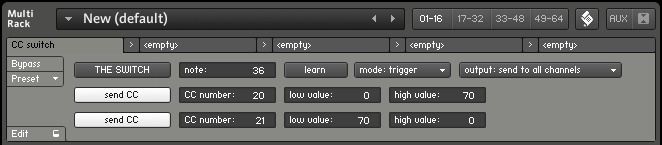
So, this script can be used to make a key act as sustain pedal, which is default setting, or to automate any other CC controller. You can assign two values to a CC and then switch between them, using midi keyboard or virtual button. Also you can set automation for secondary CC, so you could automate two different settings with the switch.

In example on screenshot, pressing MIDI key 36, will set CC20 to 0 and CC21 to 70. Releasing the key will set CC20 to 70 and CC21 to 0.

You can download the script preset here. It needs to be copied to multiscript preset folder (in my Windows it's "my documents\Native Instruments\Kontakt 4\presets\multiscripts"). This is multiscript, so you load it on top of instruments (use the scroll button). It has been written in Kontakt 4.2.4.

Thursday, June 4, 2015

Sonocipher

Sonocipher, is one completely unnecessary tool, which can convert a text string to machine drum sequence. The practical uses of this device are severely limited, as there is no backward conversion tool. However, it makes noises and it has blinking lights, so it's quite fun for those, who enjoy such activities.

Audio output example:
http://www.fairlyconfusing.net/audio/electronic_dane_music_of_tomorrow.mp3

The machine is quite simple to use, you use virtual keyboard to type in text, then press "enter" to decode it into sound sequence. "Play" button in upper right corner starts sequence playback. And here's how it works:


Sonocipher is virtual machine for Native Instruments Kontakt sampler. It requires full version of Kontakt 4.24 or newer. It is free to download and use for private or public amusement. You can get it HERE - 12MB, zip archive, includes sample set and Kontakt program.

This machine is rather simple, so there is no manual. Here are some tips and hidden functions:
  • press 'enter' when input line is empty to recall last entered text,
  • hold 'control' key while clicking the backspace button to erase whole line,
  • 'wave' button next to 'start' button activates modulation sequencers, which will animate audio effect and distribute signal to spatial processors,
  • 'hash' button triggers spatial effect auto configuration function,
  • click 'asterisk' button to generate random text sequence, then press 'enter' to decode it,
  • big blank key in bottom left corner, shifts between spatial modes, which will change signal distribution to spatial processors,
  • little blank key activates 'glitch playback' mode,
  • hold shift and click comma button to enter apostrophe character,
  • hold shift and click question mark button to enter exclamation mark character,
  • use modwheel to change sequence properties,
  • this instrument doesn't read computer keyboard, you need to click through virtual buttons,
  • the instrument only uses capital letters,
  • some functions (like clock restart or modulators reset) are only available from midi keyboard keys,
  • similar text string will generate similar sound sequences,
  • very short strings will generate very simple sequences, make your text 10 characters to make the machine use all layers, the input text limit is 50 characters.
The sample set used for Sonocipher is mainly a selection from various sets I made before. There are however some sounds which haven't been used elsewhere, like diesel engine, plastic pistol, hand drum and some synthesized sounds from my vintage Sequential Circuits synthesizer.

Graphic interface is based on stock agency photo.

There is a "melody machine" variant of this device, read here.